> ## Documentation Index
> Fetch the complete documentation index at: https://help.pawgress.ca/llms.txt
> Use this file to discover all available pages before exploring further.
# Upgrading to Pawgress Pro
> Learn how to upgrade your Pawgress account to Pro and unlock advanced features with a 90-day free trial.
## Overview
Pawgress Pro gives you access to powerful features designed to streamline your dog training business. With advanced scheduling tools, seamless integrations, and business analytics, Pro helps you save time and grow your business.
**What's Included in Pawgress Pro**
* **Session Scheduling** - Book and manage sessions with automatic reminders
* **Package Management** - Create and sell training packages with multiple sessions
* **Google Calendar integration** - Sync sessions automatically with your calendar
* **Zoom integration** - Create virtual training sessions with one click
* **Advanced Dashboard** - Business analytics and forecasting tools
* **Training templates** - Unlimited pre-defined training plans you can assign to clients
* **Custom training packages** - Create and save custom packages for different client needs
* **Report templates** - Create templates from reports for faster reporting
* **Priority support** - Faster response times and dedicated support
* **Custom branding** - Add your logo and customize client-facing materials
* **90-day free trial** - Try all Pro features risk-free
## Pricing
Choose the billing frequency that works best for your business:
* **Annual Billing:** \$192.00/year (equivalent to 16.00/month - save \$48)
* **Monthly Billing:** \$20.00/month
All plans include the full 90-day free trial with no payment required upfront.
## How to Upgrade to Pro
### Step 1: Access your account settings
After creating your Pawgress account, click on your profile icon in the top-right corner of the dashboard. Select "Account" from the dropdown menu.
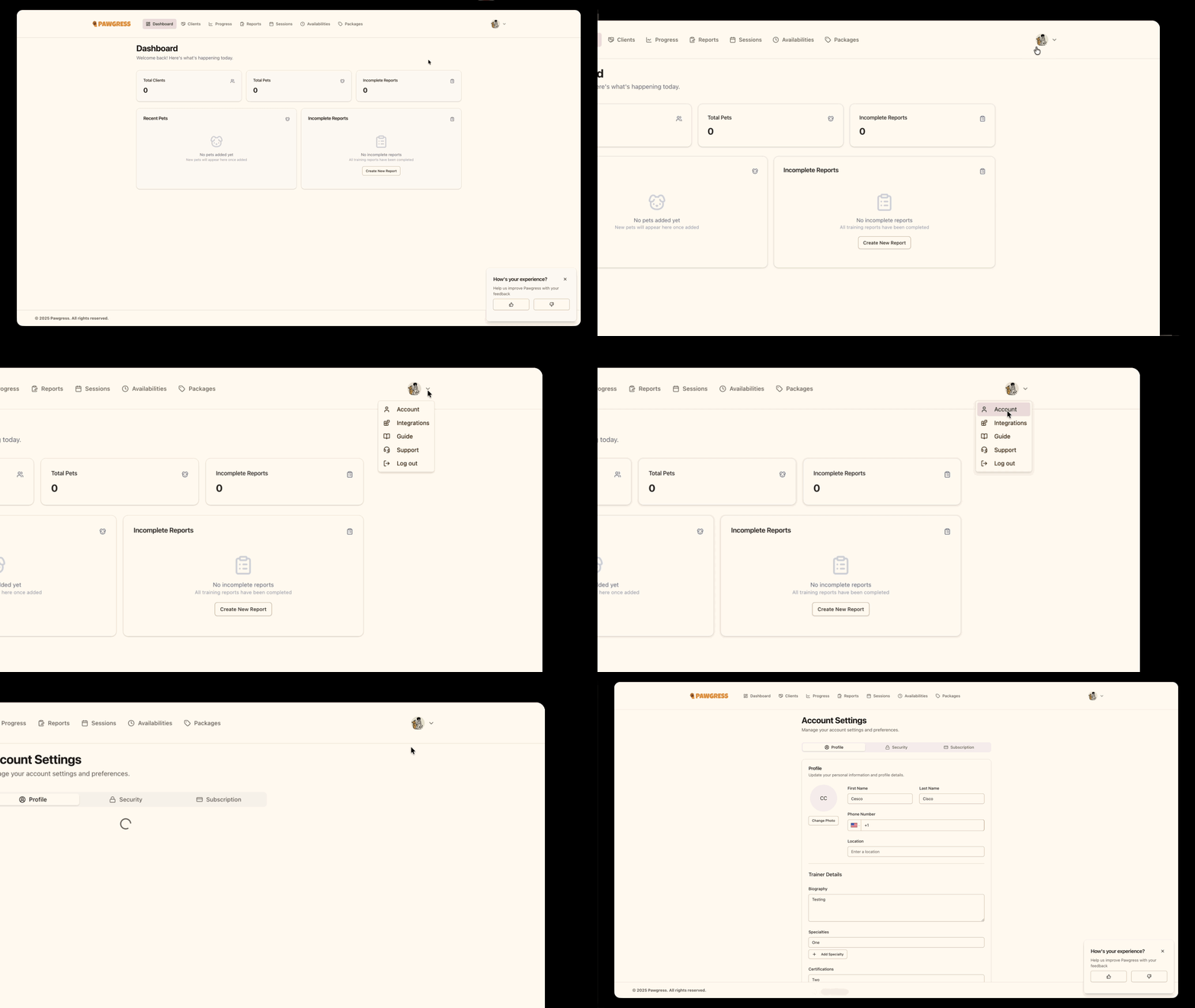
Click your profile icon to access account settings
### Step 2: Navigate to the subscription tab
In the account settings sidebar, click on "Subscription" to view your subscription options.
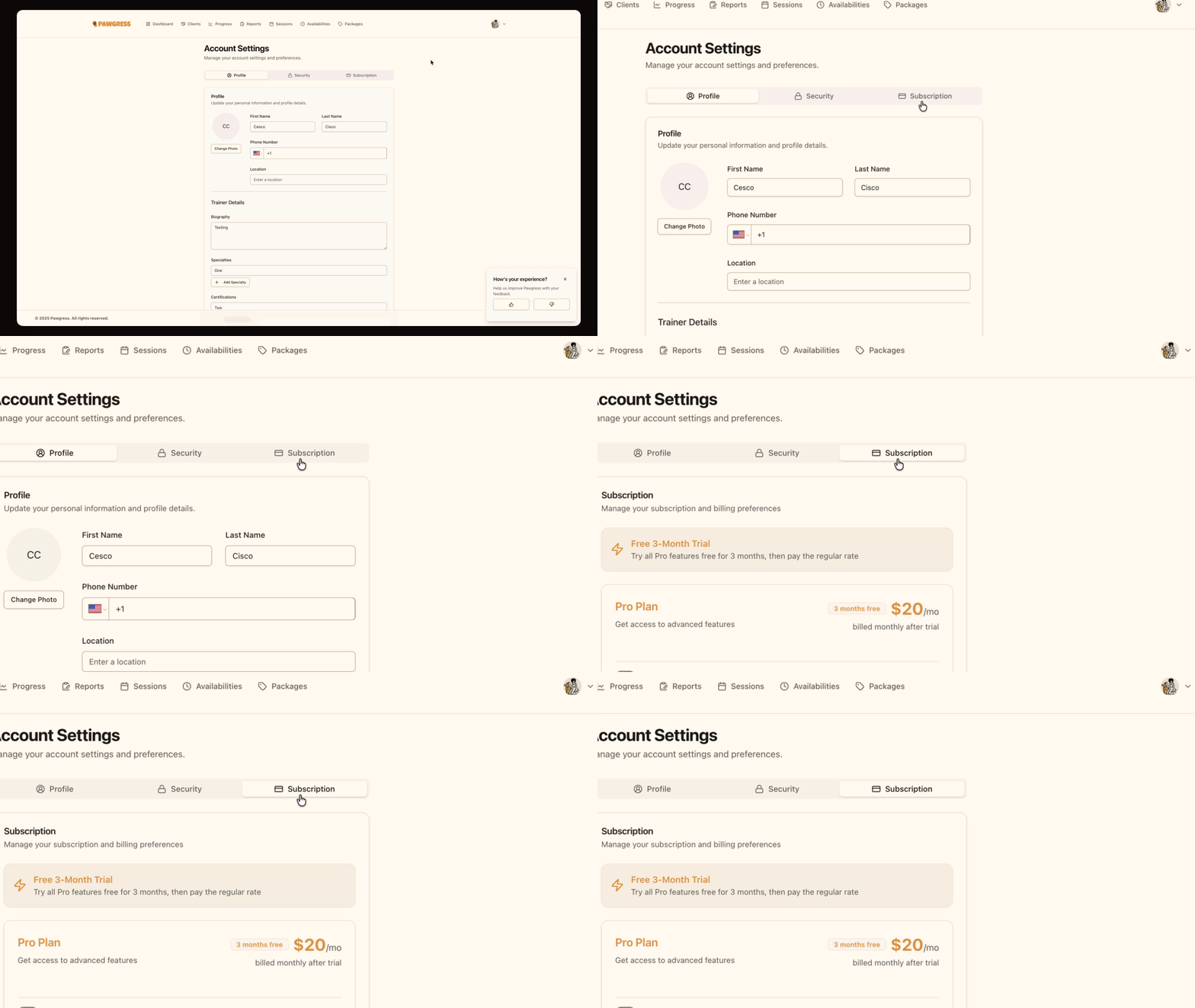
Navigate to the Subscription tab to view Pro Plan options
### Step 3: Review Pro Plan benefits
On the subscription page, you'll see a detailed overview of what's included in Pawgress Pro, along with pricing information for both monthly and annual billing.
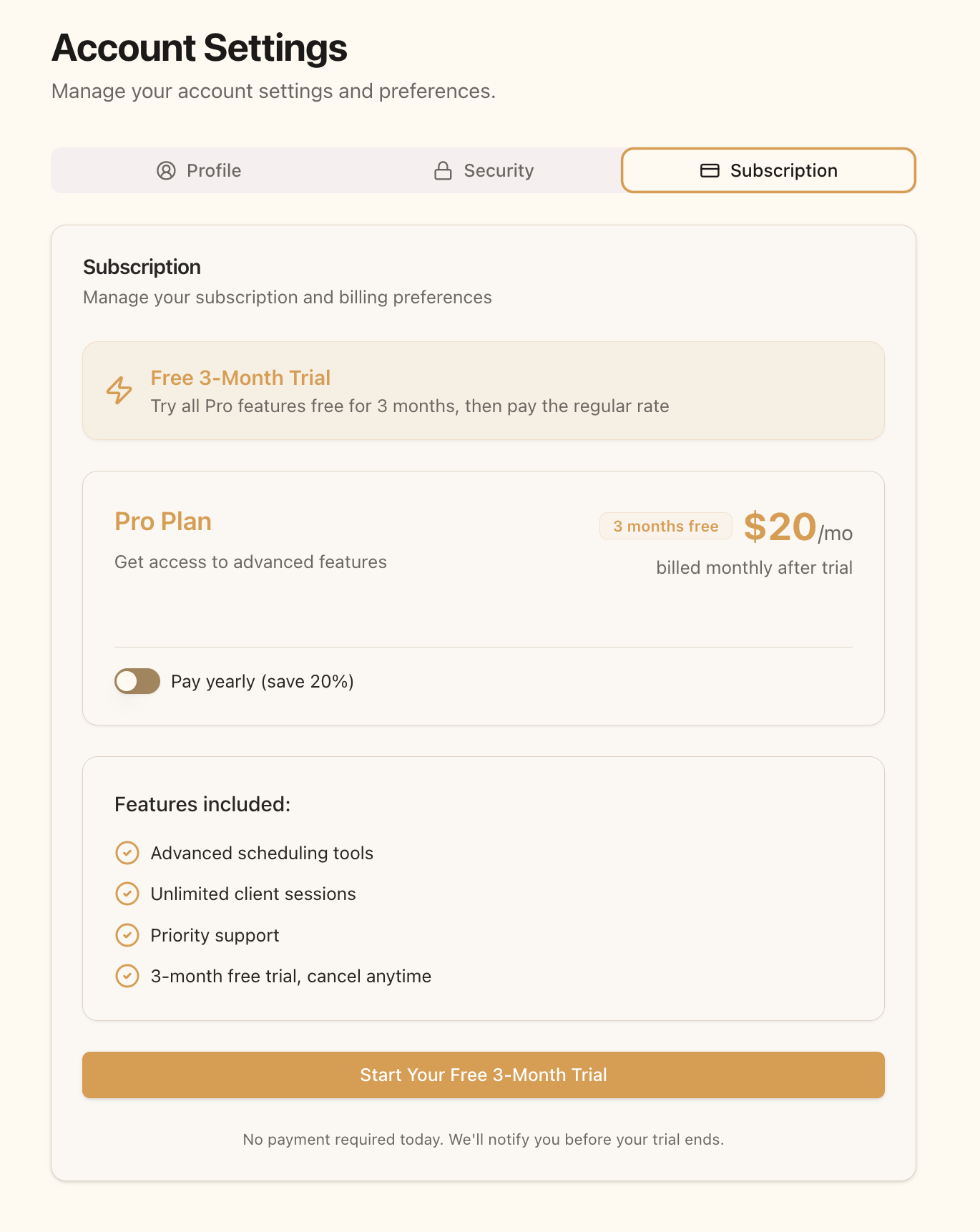 Review the Pro Plan features and pricing
### Step 4: Choose your billing frequency
Before starting your free trial, select whether you'd prefer to be billed monthly or annually after your trial ends:
* Toggle the "Pay yearly" switch **ON** for annual billing (\$192.00/year)
* Leave the toggle **OFF** for monthly billing (\$20.00/month)
**Save with Annual Billing**
Choosing annual billing saves you \$120 per year compared to monthly billing. That's equivalent to getting more than 4 months free!
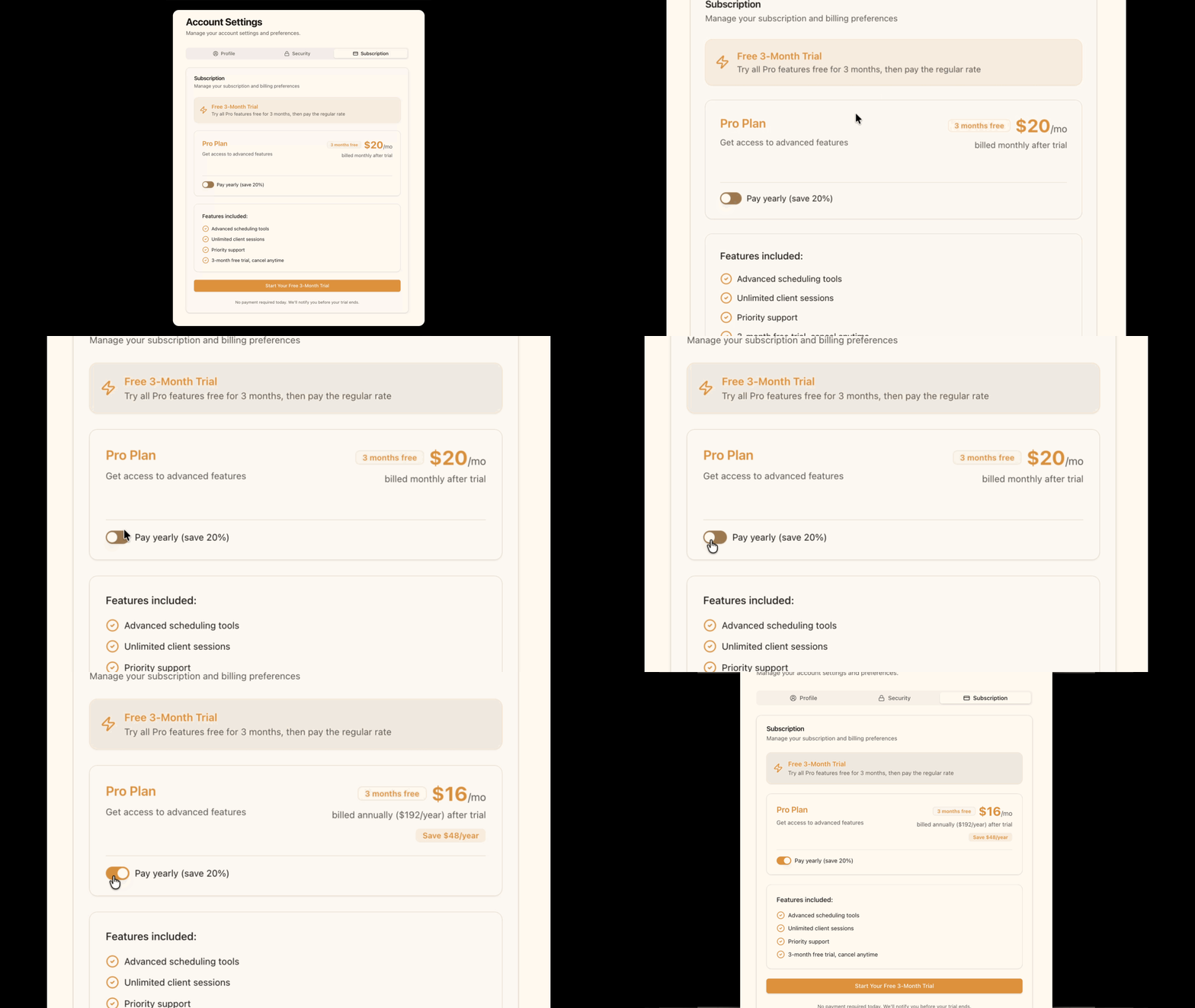
Toggle between monthly and annual billing
### Step 5: Start your free trial
Click the "Start Your Free 3-Month Trial" button. You'll be redirected to Stripe's secure checkout page to enter your payment information.
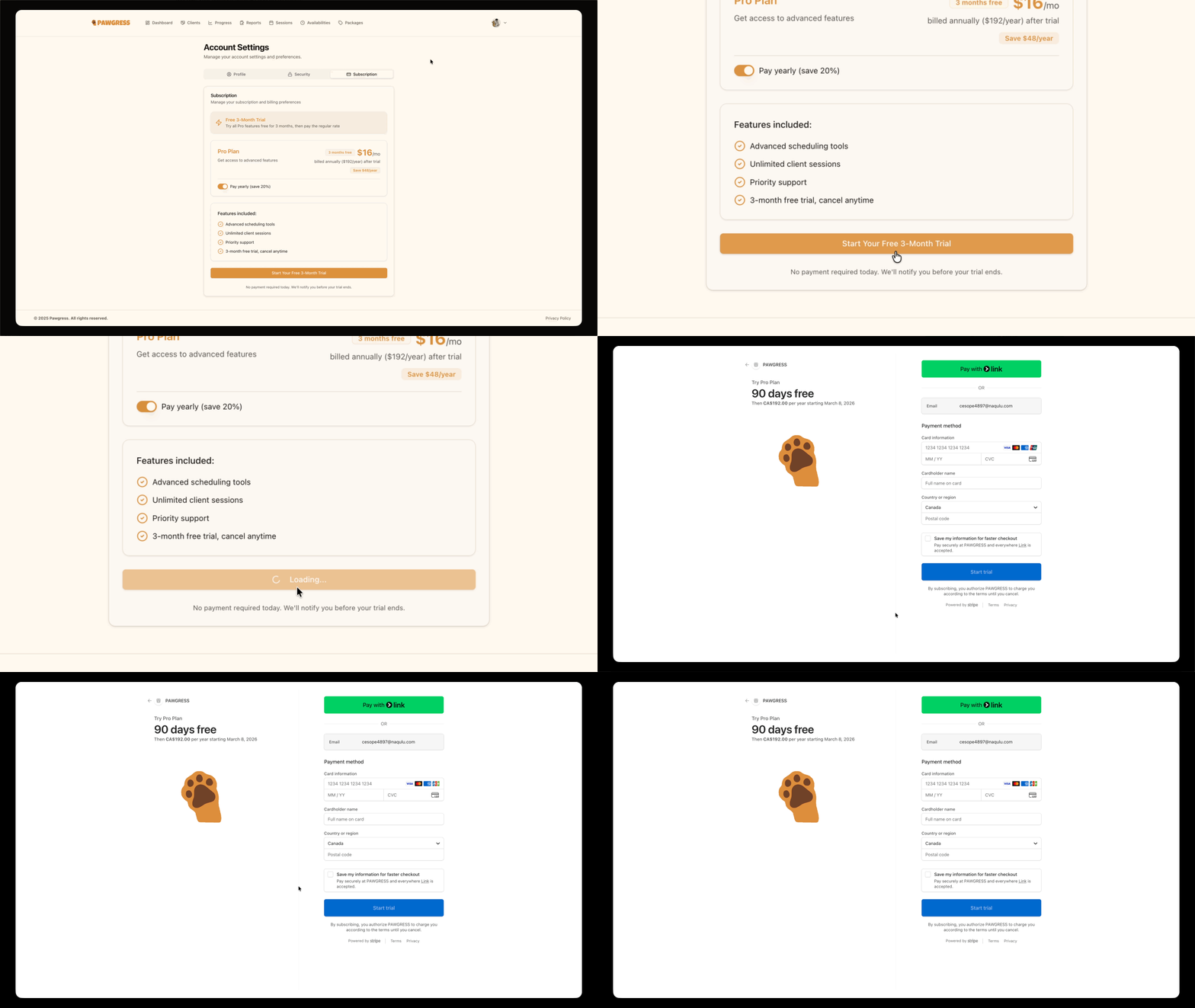
Click to start your 90-day free trial
**Important: No Immediate Charge**
When you start your free trial, your payment card will **not** be charged immediately. Stripe securely stores your payment information and will only charge you after your 90-day trial period ends. You'll receive an email notification before any charges occur, and you can cancel anytime during the trial with no cost.
### Step 6: Complete Stripe checkout
On the Stripe checkout page, enter the following information:
1. **Email address** - Should match your Pawgress account email
2. **Card information** - Your payment card details
3. **Billing address** - Your billing address information
After reviewing your information, click "Subscribe" to confirm and start your trial.
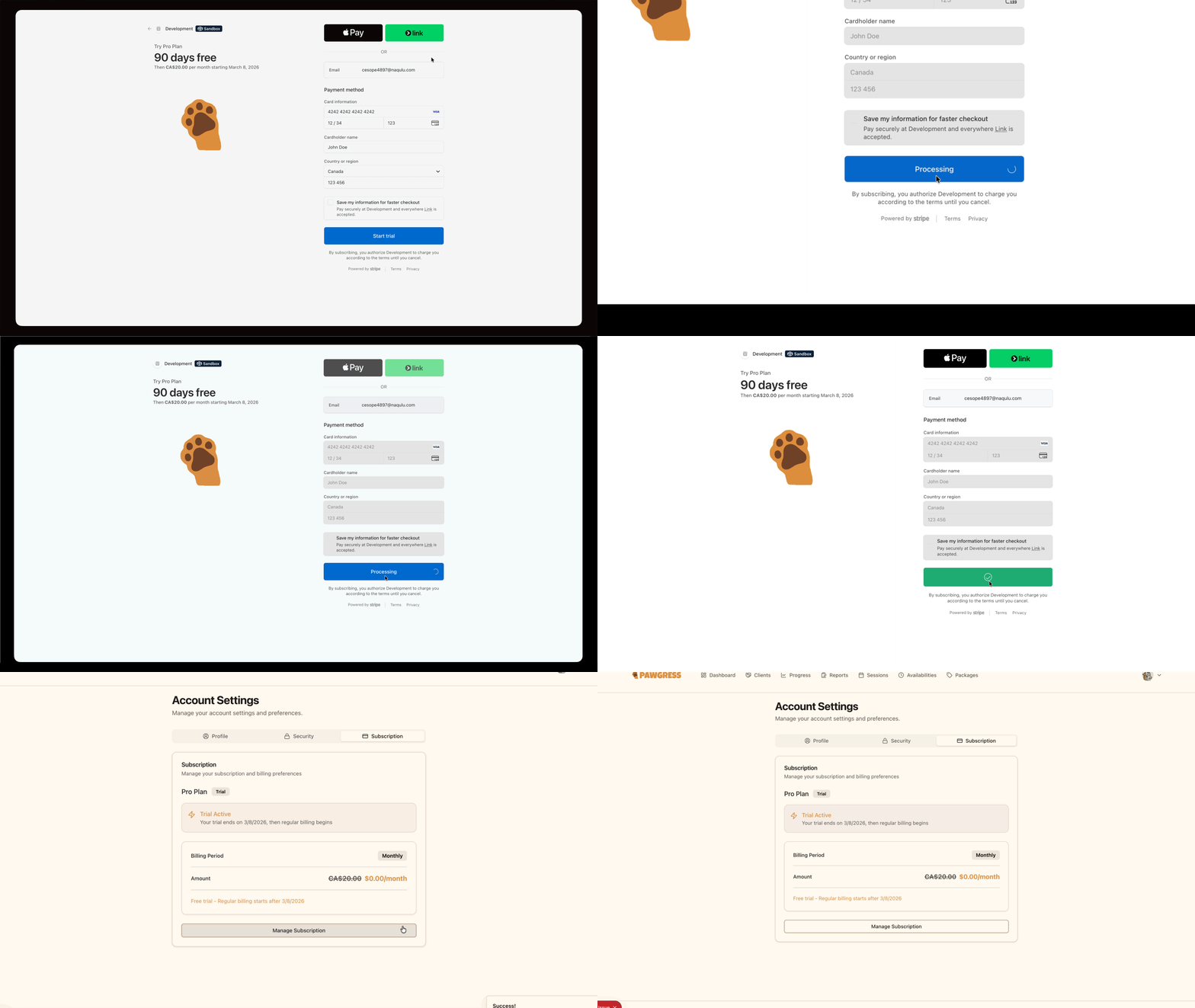
Enter your payment details on the secure Stripe checkout page
### Step 7: Trial confirmation
After completing checkout, you'll be redirected back to Pawgress with your Pro trial now active. Your subscription page will display:
* **Trial Status** - Shows your trial is active
* **Trial End Date** - When your trial expires (90 days from start)
* **Selected Plan** - The plan that will activate after your trial
Review the Pro Plan features and pricing
### Step 4: Choose your billing frequency
Before starting your free trial, select whether you'd prefer to be billed monthly or annually after your trial ends:
* Toggle the "Pay yearly" switch **ON** for annual billing (\$192.00/year)
* Leave the toggle **OFF** for monthly billing (\$20.00/month)
**Save with Annual Billing**
Choosing annual billing saves you \$120 per year compared to monthly billing. That's equivalent to getting more than 4 months free!

Toggle between monthly and annual billing
### Step 5: Start your free trial
Click the "Start Your Free 3-Month Trial" button. You'll be redirected to Stripe's secure checkout page to enter your payment information.

Click to start your 90-day free trial
**Important: No Immediate Charge**
When you start your free trial, your payment card will **not** be charged immediately. Stripe securely stores your payment information and will only charge you after your 90-day trial period ends. You'll receive an email notification before any charges occur, and you can cancel anytime during the trial with no cost.
### Step 6: Complete Stripe checkout
On the Stripe checkout page, enter the following information:
1. **Email address** - Should match your Pawgress account email
2. **Card information** - Your payment card details
3. **Billing address** - Your billing address information
After reviewing your information, click "Subscribe" to confirm and start your trial.

Enter your payment details on the secure Stripe checkout page
### Step 7: Trial confirmation
After completing checkout, you'll be redirected back to Pawgress with your Pro trial now active. Your subscription page will display:
* **Trial Status** - Shows your trial is active
* **Trial End Date** - When your trial expires (90 days from start)
* **Selected Plan** - The plan that will activate after your trial
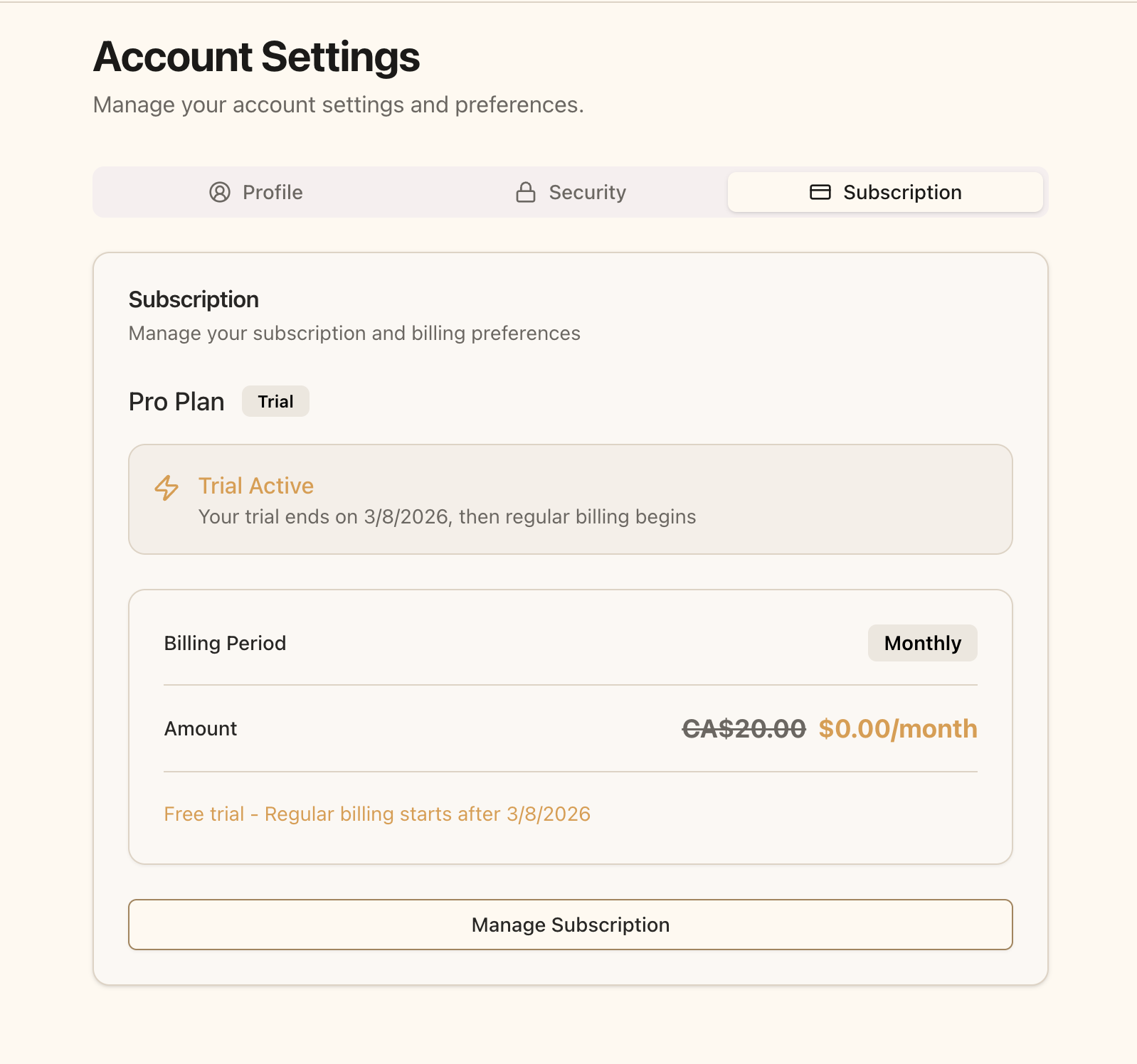 Your subscription page showing the active Pro trial
## What Happens After My Trial?
After your 90-day free trial ends:
1. You'll receive an email notification **7 days before** your trial expires
2. Your payment method will be charged automatically based on your selected billing frequency (monthly or annual)
3. You'll continue to have uninterrupted access to all Pro features
4. You can cancel anytime before the trial ends to avoid being charged
## Managing Your Subscription
Once you've started your Pro trial, you have full control over your subscription:
* **Change billing frequency** - Switch between monthly and annual billing
* **Update payment method** - Change your payment card or billing address
* **Cancel subscription** - Cancel anytime during or after your trial
For detailed instructions on managing your subscription, see our [Subscription Management guide](/guides/billing/subscription-management).
## Basic Plan Features
If you choose not to upgrade to Pro, you can continue using Pawgress Basic (free forever) with these features:
* **Unlimited clients and pets** - No restrictions on how many clients you can manage
* **Client and pet profiles** - Store contact information, notes, and pet details
* **Progress tracking** - Log and monitor training progress for each pet
* **Basic reports** - Create training reports for clients
* **Email support** - Get help from our support team
**What you won't have access to:**
* Session scheduling system
* Package management
* Google Calendar and Zoom integrations
* Training templates and custom training plans
* Advanced dashboard with business analytics
* Custom branding
**Questions About Pro?**
If you have questions about upgrading to Pro or which features are included, our support team is here to help:
* Email: [support@pawgress.ca](mailto:support@pawgress.ca)
* Support page: [pawgress.ca/support](https://pawgress.ca/support)
## Next Steps
Now that you've upgraded to Pro, make the most of your subscription:
1. [Set up Google Calendar integration](/guides/integration/google-calendar) - Automatically sync your training sessions
2. [Configure Zoom integration](/guides/integration/zoom) - Enable virtual training sessions
3. [Set your availability](/guides/scheduling/set-availability) - Let clients book sessions automatically
4. [Create training packages](/guides/getting-started/create-package) - Offer bundled session packages
These features will help you maximize the value of your Pawgress Pro subscription and streamline your dog training business.
Your subscription page showing the active Pro trial
## What Happens After My Trial?
After your 90-day free trial ends:
1. You'll receive an email notification **7 days before** your trial expires
2. Your payment method will be charged automatically based on your selected billing frequency (monthly or annual)
3. You'll continue to have uninterrupted access to all Pro features
4. You can cancel anytime before the trial ends to avoid being charged
## Managing Your Subscription
Once you've started your Pro trial, you have full control over your subscription:
* **Change billing frequency** - Switch between monthly and annual billing
* **Update payment method** - Change your payment card or billing address
* **Cancel subscription** - Cancel anytime during or after your trial
For detailed instructions on managing your subscription, see our [Subscription Management guide](/guides/billing/subscription-management).
## Basic Plan Features
If you choose not to upgrade to Pro, you can continue using Pawgress Basic (free forever) with these features:
* **Unlimited clients and pets** - No restrictions on how many clients you can manage
* **Client and pet profiles** - Store contact information, notes, and pet details
* **Progress tracking** - Log and monitor training progress for each pet
* **Basic reports** - Create training reports for clients
* **Email support** - Get help from our support team
**What you won't have access to:**
* Session scheduling system
* Package management
* Google Calendar and Zoom integrations
* Training templates and custom training plans
* Advanced dashboard with business analytics
* Custom branding
**Questions About Pro?**
If you have questions about upgrading to Pro or which features are included, our support team is here to help:
* Email: [support@pawgress.ca](mailto:support@pawgress.ca)
* Support page: [pawgress.ca/support](https://pawgress.ca/support)
## Next Steps
Now that you've upgraded to Pro, make the most of your subscription:
1. [Set up Google Calendar integration](/guides/integration/google-calendar) - Automatically sync your training sessions
2. [Configure Zoom integration](/guides/integration/zoom) - Enable virtual training sessions
3. [Set your availability](/guides/scheduling/set-availability) - Let clients book sessions automatically
4. [Create training packages](/guides/getting-started/create-package) - Offer bundled session packages
These features will help you maximize the value of your Pawgress Pro subscription and streamline your dog training business.