

Package Overview
Training packages are the foundation of your service offerings in Pawgress. They allow you to define your training services, set pricing, and establish scheduling parameters. Clients can purchase these packages and schedule sessions based on your availability.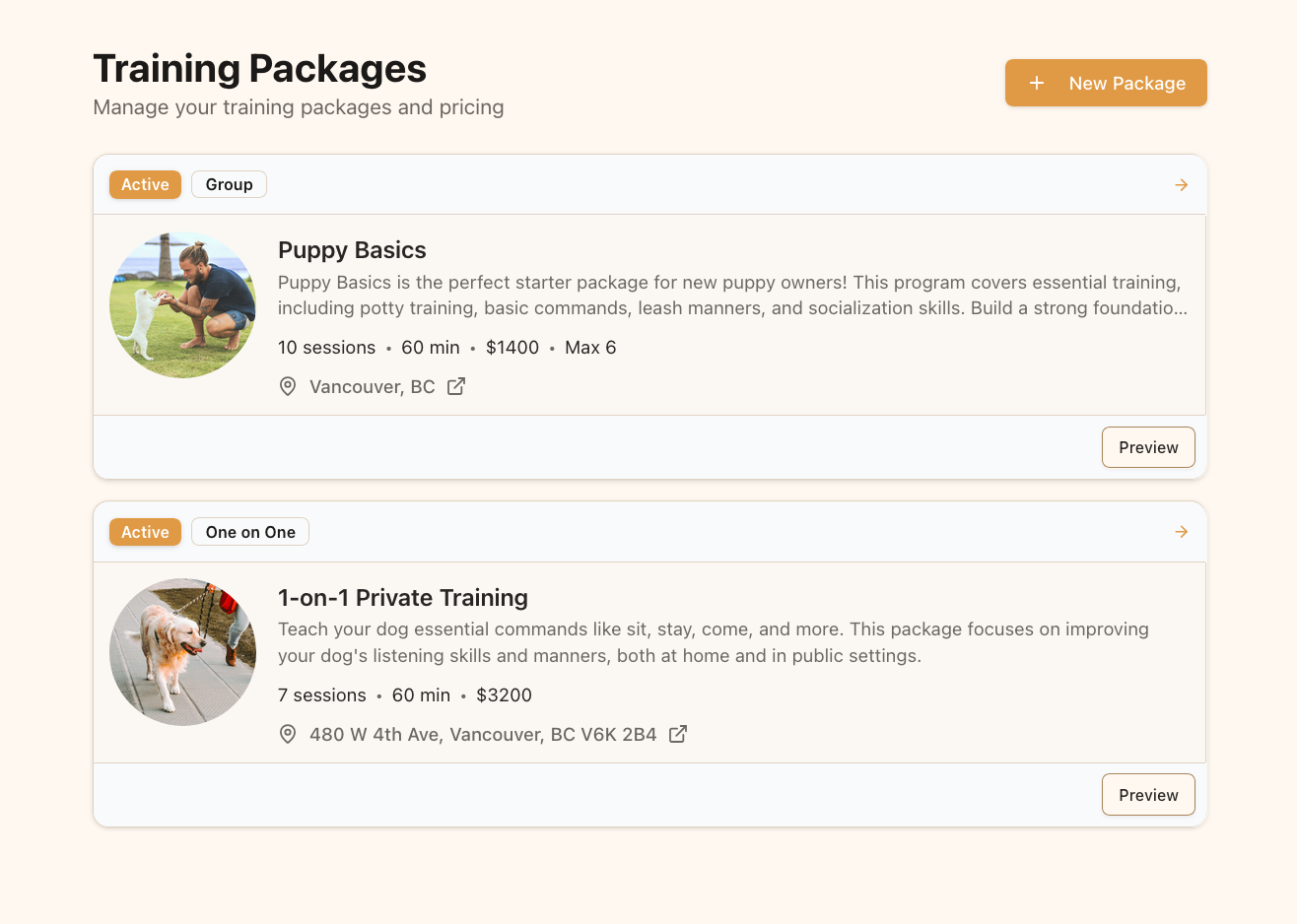
The Training Packages page displays all your available service offerings
Creating Your First Package
Step 1: Navigate to the Packages Page
From your dashboard, click on “Training Packages” in the main navigation menu. This will take you to the packages overview page.Step 2: Create a New Package
Click the “New Package” button in the top right corner of the page. This will open the package creation form.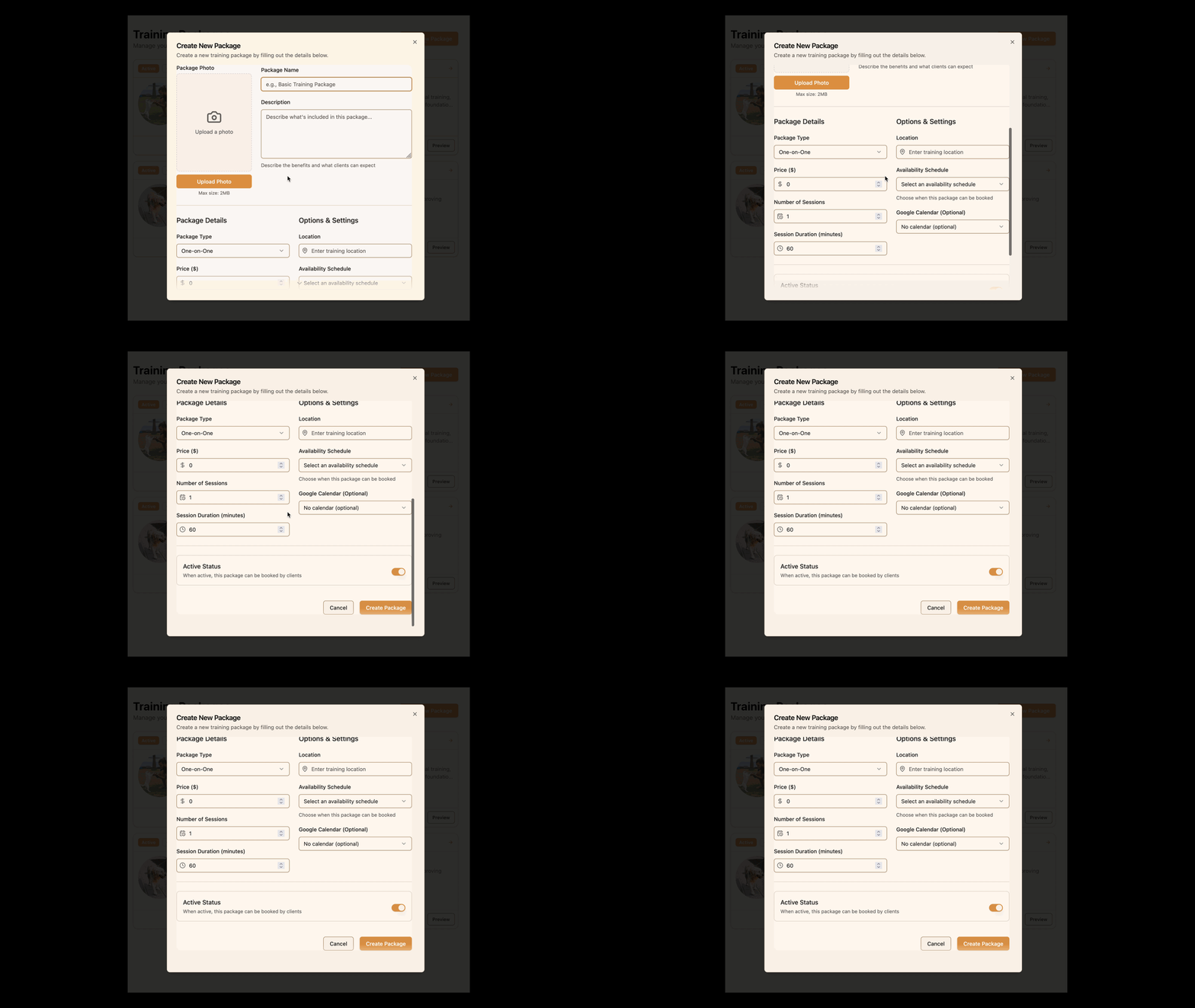
Click the “New Package” button to create a new training package
Package Details
Adding a Package Photo
A visually appealing package photo helps attract clients:- Click on the photo upload area on the left side of the form
- Select a high-quality image that represents the training package
- The image should be less than 2MB in size
- Photos that show trainers working with dogs tend to perform best
Basic Information
Fill out these essential details about your package:- Package Name: Create a clear, descriptive name (e.g., “Puppy Basics - 6 Week Program”)
- Description: Write a detailed description that explains what clients will receive, the benefits, and who the package is best suited for
Package Details
Define the structure and pricing of your package:- Package Type: Choose between one-on-one or group training
- Price: Set the total cost for the entire package
- Number of Sessions: Specify how many training sessions are included
- Session Duration: Define how long each session will last (in minutes)
Options & Settings
Configure additional package settings:- Maximum Participants: For group packages, set the maximum number of clients who can attend
- Location: Specify where the training sessions will take place
- Availability Schedule: Link the package to one of your availability schedules (these must be created separately)
- Google Calendar: Optionally connect to a specific Google Calendar for scheduling
Availability SchedulesBefore creating packages, you’ll need to set up at least one availability schedule in the Availability section. This tells Pawgress when you’re available to conduct training sessions.
Active Status
At the bottom of the form, you’ll find the Active Status toggle:- When turned on, the package is visible to clients and available for booking
- When turned off, the package is hidden from clients but still accessible to you
Saving Your Package
Once you’ve filled out all the required information:- Review all the details to ensure accuracy
- Click the “Create Package” button at the bottom of the form
- Your new package will be saved and added to your packages list
Managing Your Packages
Viewing Your Packages
Return to the Training Packages page to see all your created packages:- Each package card displays key information (name, price, sessions)
- Click on a package to view its full details or make edits
- Use the status toggle on each card to quickly activate or deactivate packages
Package Strategy Tips
Consider these strategies when creating your packages:- Tiered Offerings: Create basic, standard, and premium packages at different price points
- Specialized Packages: Develop packages for specific needs (puppy training, behavior modification, etc.)
- Seasonal Offerings: Create special packages tied to seasons or holidays
- Package Bundles: Offer discounts for clients who purchase multiple packages
Next Steps
Now that you’ve created your first training package, you’re ready to:- Set up your availability schedules (if you haven’t already)
- Schedule sessions with clients
- Create additional packages for different training needs
- Review and optimize your packages based on client feedback