

Complete Your Trainer Profile
A complete profile helps build trust with potential clients and makes a great first impression. This guide will walk you through setting up your Pawgress profile with all the essential information clients need to know about you and your training services.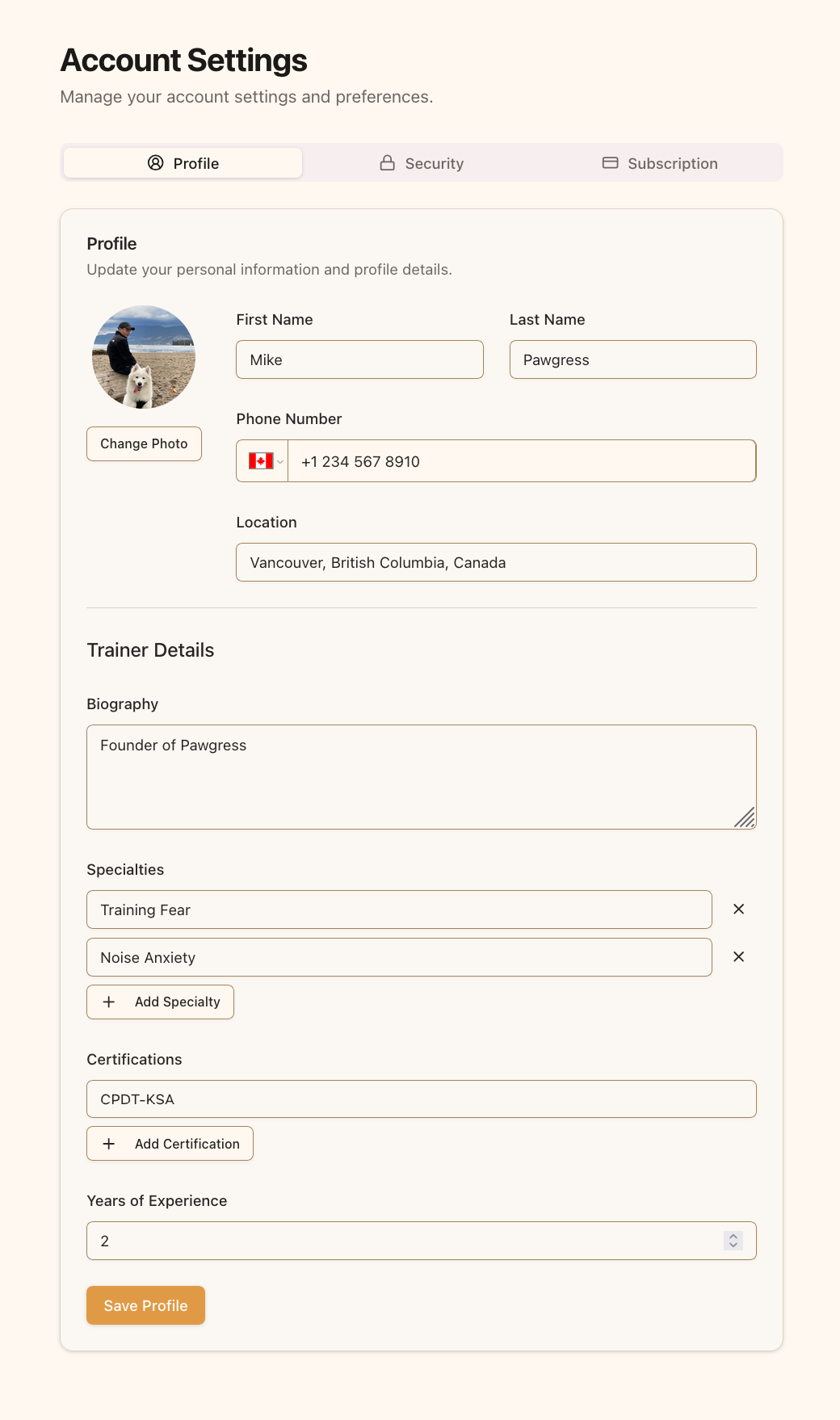
The profile page lets you manage your personal and professional information
Personal Information
Adding Your Profile Photo
Adding a professional profile photo helps clients recognize you and builds trust:- Click on the avatar or the “Change Photo” button
- Select a clear, professional photo of yourself
- Upload an image smaller than 2MB in JPG, PNG, or GIF format
- Your photo will appear on your profile and in client communications
Basic Contact Details
Fill out these essential fields in the Basic Information section:- First Name: Your first name as you’d like clients to see it
- Last Name: Your last name as you’d like clients to see it
- Phone Number: Your business contact number (visible to connected clients)
- Location: Your primary training area (city, neighborhood, region)
Trainer Professional Details
As a professional dog trainer, you’ll want to showcase your expertise:Biography
Write a compelling biography that highlights:- Your training philosophy and approach
- What makes your training style unique
- Your background and how you started training
- Your passion for working with dogs and their owners
Specialties
List your areas of expertise in dog training:- Puppy training and socialization
- Behavior modification (reactivity, aggression, anxiety)
- Specific training approaches (positive reinforcement, clicker training)
- Specialized skills (therapy dog preparation, service dog training)
Certifications
Include your professional certifications to build credibility:- Professional certifications (CPDT-KA, IAABC, KPA-CTP, etc.)
- Educational credentials
- Specialized training programs completed
- Professional memberships
Years of Experience
Enter the number of years you’ve been professionally training dogs. This helps clients understand your level of experience at a glance.Profile Completeness MattersA complete profile makes you more discoverable to potential clients and instills confidence in your professional abilities. Take time to fill out each section thoughtfully—it’s your virtual first impression!
Saving Your Profile
After filling out your profile information:- Review all information for accuracy
- Click the “Save Profile” button at the bottom of the page
- Wait for the confirmation message that your profile has been updated